WebSocket as a signal: driver jobs without polling
The driver app polled for jobs every 30 seconds. Now a WebSocket only signals a change, data comes from the API, and polling stays as a fallback.
Published: 5 min read
Author: Łukasz Głowacz, Full-Stack Engineer · Czytaj po polsku
Contents
Until recently, the driver app in BusiKM asked the server for the job list every 30 seconds. A dispatcher would change a status or assign a new job, and the driver would see it up to half a minute late, even though the backend was already sending these changes over WebSocket to the web panel. On October 9 I connected the same channel in the mobile app. The most important decision wasn't about the WebSocket itself, but about what to do with the message that arrives through it.
The backend already sent events
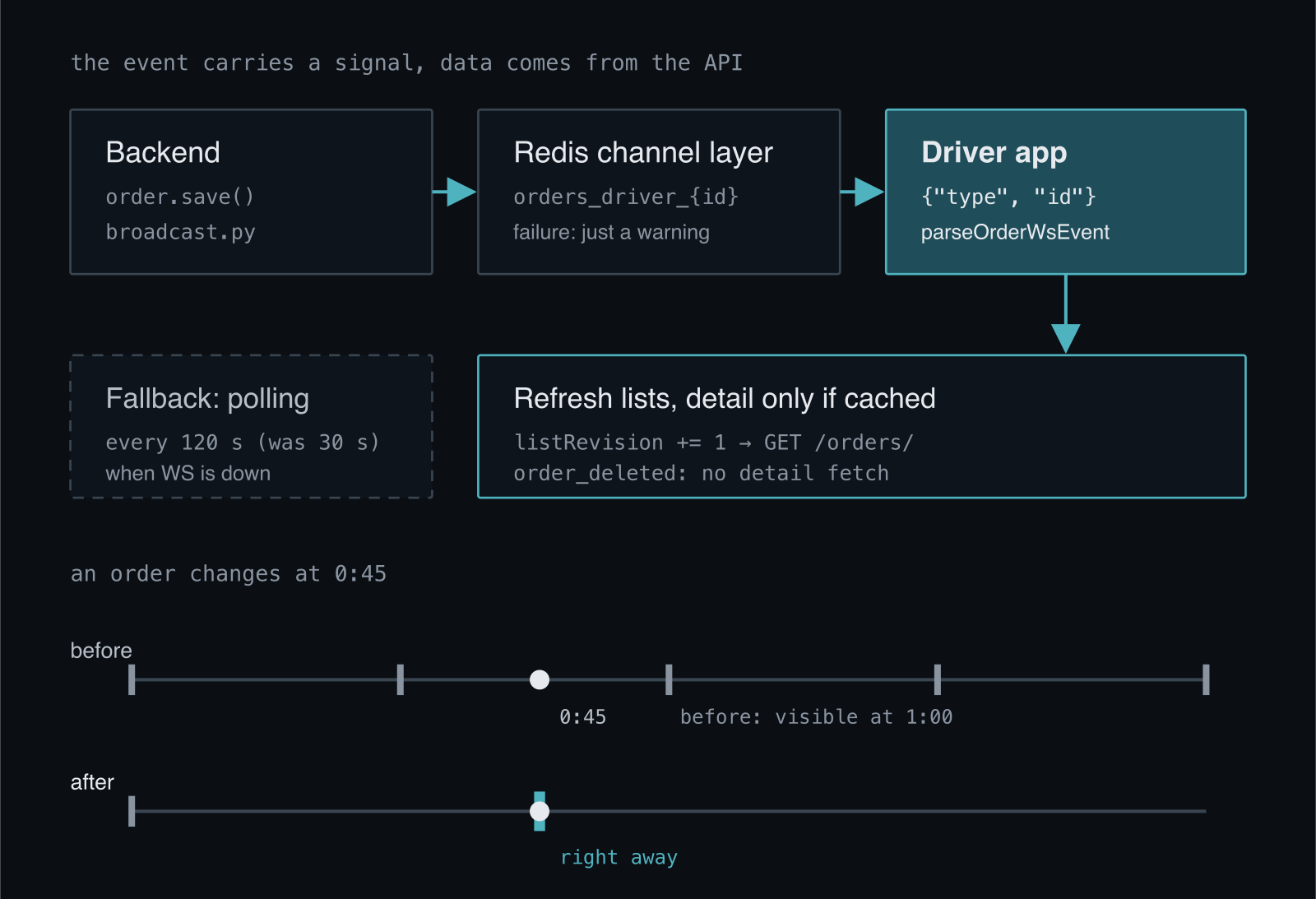
Every job change in the backend (status, assignment, unassignment, creation and deletion) goes through a single module, broadcast.py. It sends an event through Django Channels and Redis to several groups: the whole company, the fleet map, and, if the job has a driver assigned, that driver's own group orders_driver_{id}. So a driver receives only events for their own jobs, not for the whole company.
One thing in this module matters for the client. Sending is a side effect of the write, not part of it:
for group in groups:
    try:
        async_to_sync(layer.group_send)(group, {"type": channel_type, "payload": payload})
    except Exception as exc:
        # A broadcast is a side effect. Redis being down must not fail POST /orders/.
        logger.warning("Order broadcast %s failed for group=%s: %s", channel_type, group, exc)
If Redis is down, the job write succeeds and the event simply isn't sent. That's a good decision for the backend, but it means the client can't assume it will get every event. This fact shaped the rest of the design on the app side.
The event as a signal, not data
A status change event carries the job number, the old and new status, the time of the change and a few other fields. It's tempting to put these values straight into the app's cache and not ask the server at all. I didn't do that. The event doesn't carry the full job, and the details screen shows much more, for example route stages and documents. Patching the cache with partial data produces a state that exists nowhere else: a new status next to old stages, or a job in the list that should have disappeared after the status change.
So the app reads only two things from the event: the type and the job identifier. It treats the rest as a "something changed" signal and fetches current data from the API, just like on a regular refresh.
/** Order event from a WS frame; `connected`, `pong` and malformed frames return null. */
export const parseOrderWsEvent = (raw: unknown): OrderWsEvent | null => {
  // ...JSON.parse with try/catch
  if (!isObject(data) || !isOrderEventType(data.type)) return null;
  const orderId = Number(data.id ?? data.order_id);
  if (!Number.isInteger(orderId) || orderId <= 0) return null;
  return { type: data.type, orderId };
};

/** Lists always; the detail only if the driver has opened it (it is in the cache). */
export const applyOrderWsEvent = (event: OrderWsEvent, deps: OrderWsDeps): void => {
  deps.invalidateLists();
  if (event.type !== "order_deleted" && deps.isDetailCached(event.orderId)) {
    void deps.refreshDetail(event.orderId).catch(() => undefined);
  }
};
I fetch job details only if they're already in the cache, meaning the driver has opened them. Fetching details of a job they never viewed would be a pointless request. On deletion there's nothing to fetch, so only the lists are refreshed. This logic lives in a separate function with no React and no WebSocket, so the tests exercise it on plain objects.
The cost is one extra request after each event. But it happens only when something actually changed, not every 30 seconds regardless of whether anything happened.
A counter instead of a new refresh mechanism
The job list already had its own hook with polling. I didn't want to add a second data-fetching path next to it, so the event does one thing: it bumps a counter in the store.
// orders-store: grows on every WS order event
listRevision: 0,
invalidateLists: () => set((state) => ({ listRevision: state.listRevision + 1 })),

// useOrders: the revision is a dependency of the effect that fetches and polls
useEffect(() => {
  void refresh();
  const id = setInterval(() => void refresh(), interval ?? DEFAULT_POLL_INTERVAL_MS);
  return () => clearInterval(id);
}, [refresh, options.pollIntervalMs, revision]);
Changing the counter re-runs the effect: the list is fetched immediately, and the polling countdown restarts from zero. There's no separate "refresh after event" function that could someday start doing something different from a regular refresh.
Polling stays, but every 120 seconds
Since the backend may not send an event, and a phone on the road loses coverage every now and then, I didn't turn polling off. I only changed its role. Before, it was the main source of changes and ran every 30 seconds. Now it's a safety net for a dropped connection and runs every 120 seconds.
After a drop, the WebSocket connection tries to reconnect three times, after 1, 2 and 4 seconds, the same way the chat and the work-time module do. A close with code 4001 (not authenticated) or 4003 (no company) ends the attempts immediately, because retrying won't change anything. Once the attempts run out, the app keeps working on polling alone, just seeing changes more slowly.
What's still to improve
After the connection is restored, the app doesn't refresh the lists right away. Events that arrived during the outage aren't replayed, so in the worst case a change shows up only at the next poll, up to 120 seconds later. The fix is simple: bump the same counter on reconnect, so the app immediately fetches the current state.
The second limitation concerns the token. The app passes it as a parameter in the connection URL, just like the web panel, because the browser WebSocket API doesn't let you set a custom header. It's a common solution, but a URL containing a token must not end up in server or proxy logs, so this has to be watched on the infrastructure side.
One rule from this change turned out the most useful: the event says that something changed, and state comes from a single source, the API. In the post about read-only mode I described how this same app reacts to a subscription lock, and here you can see that even a simple "live" feature in a mobile app comes down to the question of what to do when a message doesn't arrive. If you're building a similar channel in your own app, get in touch.